Discover the latest in wireless door locks designed for home security. This guide compares top residential models that connect via Wi‑Fi or Bluetooth, offer remote access, and support multiple unlocking methods. Learn how to choose based on connectivity, power, ease of installation, and user management.
Summary Table: Selected Products
| Product | Brand | Key Features |
|---|---|---|
| eufy Security Smart Lock C30 | eufy Security | Built-in Wi‑Fi, keyless entry, auto-lock, remote control |
| Philips Wi‑Fi Smart Lock With Handle | Philips | Handle-equipped, app control, fingerprint and PIN options |
| TEEHO TE012W WiFi Smart Lock | TEEHO | Built-in Wi‑Fi, 5 unlock methods, AES-128 encryption |
| Schlage Encode Smart WiFi Deadbolt | SCHLAGE | Built-in Wi‑Fi, up to 100 access codes, voice control |
| Veise VE012W Built-in WiFi Lock | Veise | 6‑in‑1 access, AI fingerprint, no hub required |
eufy Security Smart Lock C30

The eufy C30 model combines built-in Wi‑Fi with keyless entry and a keypad deadbolt for front doors. It supports remote operation via the eufy Security app and does not require an additional bridge. The lock offers multiple access methods including physical key entry, app control, and voice commands with Alexa or Google Assistant. Auto-lock helps secure the door after a set period, enhancing daily security. The product emphasizes reliability with a physical button interface and durable build compared to touchscreens. Installation is described as straightforward for typical front doors.
Philips Wi‑Fi Smart Lock With Handle

The Philips lock features a handle-equipped design that blends aesthetics with functionality. It supports remote management through the Philips app, allowing you to lock, unlock, and monitor door status from anywhere (gateway connection required). The system offers multiple unlocking methods, including fingerprint, PIN, and voice command via Alexa or Google Assistant, along with standard keys. Remote permissions management is a core feature, enabling easy guest access and real-time notifications. A gateway (included) is needed for full remote operation.
TEEHO TE012W WiFi Smart Lock

The TE012W model provides built-in Wi‑Fi with direct app control via KK Home, avoiding hubs. It integrates with Alexa and Google Assistant for voice control and supports comprehensive access options, including app-based management, fingerprint recognition, PIN codes, physical keys, and voice commands. Data security is highlighted with AES‑128 encryption and local data storage for privacy. It targets busy households and rentals seeking flexible, modern entry management across doors or entrances.
TEEHO TE001 Keyless Entry Door Lock
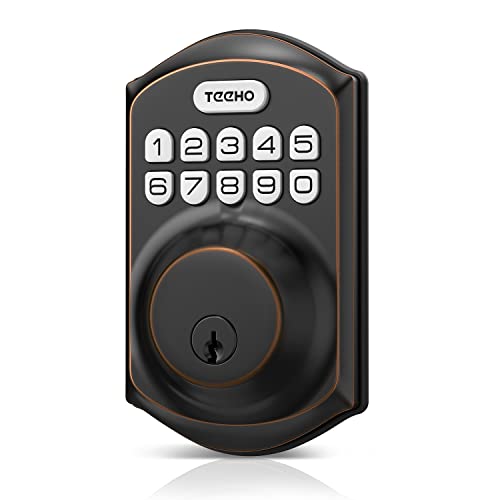
The TE001 model is a keypad-based smart deadbolt designed for front doors, featuring 20 user codes and a one-time code option for guests. It includes auto-lock capabilities and a quick one-touch auto-lock via keypad. This model emphasizes simple installation and user-friendly management for households needing flexible access codes for family and visitors.
Schlage Encode Smart WiFi Deadbolt

The Schlage Encode combines built-in WiFi with a wide array of access options, including an app, touchscreen keypad, and voice control via Alexa or Google. Manage up to 100 access codes, track lock history, and receive notifications as part of a secure, scalable solution for homes with frequent guests or service providers. It supports remote operation from anywhere once connected to a secure network and is designed for easy integration with other Schlage smart home devices.
Kwikset SmartCode 917

The Kwikset SmartCode 917 provides keypad-based access with SmartKey security and up to 30 user codes. It supports multiple entry modes, including Auto Lock and Passage, making it suitable for households with various occupants. The lever and handle style adds a contemporary look, and installation can be completed on many standard doors. The device emphasizes straightforward programming and flexible access options for daily use and property management.
Veise VE012W WiFi Smart Lock

The Veise VE012W offers built-in WiFi and 6‑in‑1 access: app control, fingerprint (20 stored), unlimited one-time codes, 100 PINs, 2 physical keys, and voice control. The AI fingerprint recognition delivers rapid access with high accuracy, while local and remote management is facilitated through the app. It’s positioned as a versatile option for homes requiring flexible guest access and strong security features without a separate hub.
Buying Guide: Key Purchase Considerations
- Connectivity and ecosystem: Choose locks with built-in WiFi for direct remote control, or consider hubs/gateways if your preferred system requires one. Verify compatibility with your existing voice assistants (Alexa, Google Assistant) and home automation platforms.
- Access methods: Look for multiple unlocking options that suit your routine—PINs, fingerprints, physical keys, apps, or voice commands. Consider the maximum number of codes or fingerprints supported if you have many household members or guests.
- Security features: Prioritize encryption (AES-128 or higher) and tamper alerts. Confirm auto-lock timing, alarm notifications, and audit trails (lock history) to monitor entry events.
- Power and reliability: BHMA grades indicate durability; assess battery life, backup power options, and auto-lock behavior to avoid being locked out.
- Installation and fit: Ensure the lock is compatible with your door type, backset, and thickness. Some models include handles for a seamless look; others are deadbolt only.
- Data privacy: Consider where data is stored (local vs. cloud) and the level of control over guest codes and access permissions. Local storage can offer enhanced privacy for sensitive information.
- Support and updates: Check vendor software updates, warranty terms, and customer support quality to maintain security over time.