In modern facilities, reliable access control is essential for security and smooth operations. This guide highlights top RFID-based commercial door locks that support phone, card, and keypad access, helping business owners and facility managers compare features, installation needs, and support options. Below, you’ll find a concise introduction to each product, followed by a practical buying guide that covers key considerations and how to choose the right system for your doors and users.
| Product | Brand | Key Features |
|---|---|---|
| RFID Commercial Lever Door Lock (Right-Hand) | stickLabs | NFC app access, NFC sticker unlock, phone-based keycards |
| Electronic Smart Door Lock (NDL302) | Colosus | PIN, RFID card, remote control, keys; 4 access modes |
| Keypad Door Lock with Handle (2-Pack) | Cielsa Dawn | 3-in-1: Passcode + Key Fob + Emergency Key; anti-peep; Type-C for power |
| RFID Commercial Lever Door Lock (Left-Hand) | stickLabs | NFC app access, NFC sticker unlock, phone-based keycards |
| Electronic Keyless Door Lock (NDL319) | Colosus | PIN, RFID, remote, physical key; four entry modes; USA support |
Introduction continues: The products below are selected for businesses seeking scalable, secure access control with RFID or mixed entry options. They cover lever and handle designs suitable for high-traffic doors, easy installation, and multiple user-versus-credential configurations. Each entry provides a concise overview of capabilities and ideal use cases to help you compare solutions quickly.
RFID Commercial Lever Door Lock (Right-Hand) by StickLabs

StickLabs’ RFID Commercial Lever Door Lock uses NFC to grant access via a mobile app, plus additional options like unlocking with a tiny NFC sticker on the phone and creating keycards from a phone. This makes it suitable for office environments that want modern credential management without issuing physical keys. The left-right orientation and lever design support widespread door placements. Consider compatibility with your door thickness and frame, and ensure the app ecosystem meets your security and audit needs.
Electronic Smart Door Lock with Keypad (NDL302)
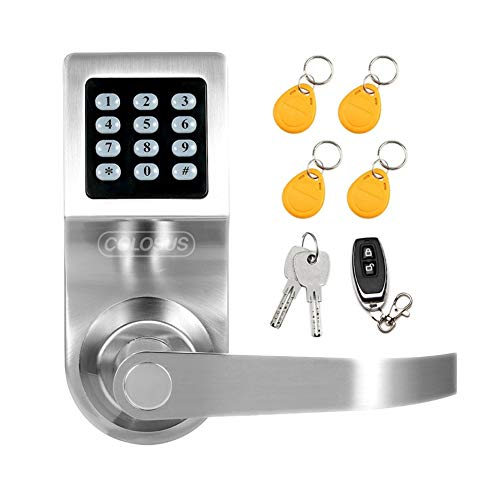
Colosus NDL302 provides four entry modes: PIN code, RFID card, remote control, and a physical key. This makes it flexible for businesses that rotate users or guests. The unit is positioned as a home, office, or commercial solution, with a US-based support team for installation and troubleshooting. When choosing this model, evaluate battery life, compatibility with your door type, and whether your team needs remote management or integration with building management systems.
Keypad Door Lock with Handle (2-Pack) by Cielsa Dawn

This 2-pack Keypad Door Lock set offers a 3-in-1 solution: Passcode, Key Fob, and Emergency Key. It includes anti-peep password and a Type-C interface for external power via a portable charger if needed. The kit’s integration with multiple access methods makes it suitable for shared office spaces or commercial interiors where staff and guests require varied entry methods. It also notes a reminder to replace batteries, aiding maintenance planning.
RFID Commercial Lever Door Lock (Left-Hand) by StickLabs
This left-handed lever lock mirrors the right-hand version with NFC app access, NFC sticker unlocking, and phone-based keycard creation. Consider the handedness of doors in your facility and ensure compatibility with your existing door hardware and signage. This model is well-suited to corridors, reception areas, and access-controlled zones where staff and visitors require seamless, credential-based entry.
Electronic Keyless Door Lock (NDL319) by Colosus
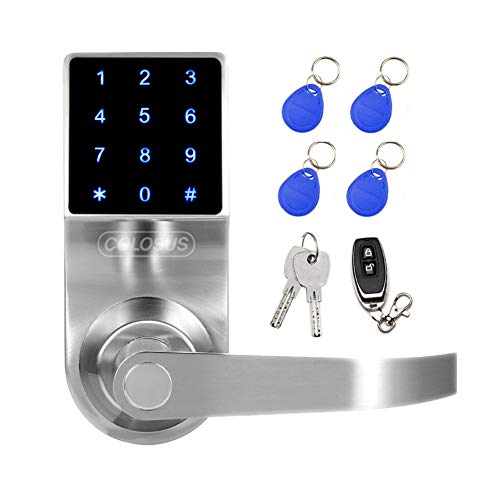
NDL319 presents a versatile mix of access modes: PIN code, RFID card, remote control, and a physical key. It is pitched for both home and business applications, with American-based support to assist with installation and troubleshooting. The four-entry options support high-traffic environments and varying user groups, making it a practical option for offices, clinics, or small commercial spaces seeking reliable access control.
Buying Guide
- Access methods: Consider whether you need RFID cards, mobile-based NFC, PIN codes, or a combination. Mixed-method locks offer flexibility for guests, contractors, and employees.
- Handedness and door compatibility: Some lever locks are right-hand only, others are reversible. Verify door thickness, backset, and strike compatibility before purchasing.
- Power and connectivity: Evaluate whether locks run on batteries, include a backup power option, or support remote updates and monitoring. Consider the need for a gateway or hub to enable cloud or remote management.
- Support and warranty: Prioritize models with US-based support or documented troubleshooting resources. A clear warranty helps mitigate maintenance costs for commercial installations.
- Security features: Look for anti-peep password, auto-lock after multiple failed attempts, audit trails, and the ability to disable lost credentials to maintain security integrity.
- Installation and maintenance: Assess the ease of installation, the availability of spare parts, and how easy it is to replace batteries or key fobs without professional help.
- Scalability: For multiple doors, choose locks that support centralized management, user provisioning, and consistent credential formats across all units.
Overview: When selecting RFID-enabled commercial door locks, balance convenience, security, and maintenance needs. Systems with multiple entry modes and solid customer support can reduce downtime and improve access control governance across small and mid-size facilities. For larger campuses, consider a centralized management solution or integration with existing security infrastructure to streamline administration and reporting.