When securing entryways, push button code door locks offer convenient, keyless access for families, guests, and staff. This guide highlights five reliable options with keypad or biometric features, focusing on quick code entry, auto-lock, and straightforward installation. Each product below is designed to blend security with everyday practicality for front doors, apartments, and offices. Explore key features, installation notes, and usage considerations to help you choose the right lock for your needs.
| Product | Brand | Key Features |
|---|---|---|
| TEEHO TE001 Keyless Entry Door Lock with Keypad – Satin Nickel | TEEHO | 20 access codes, One-Time Code, Auto lock (10-99s), easy installation |
| Veise Keypad Door Lock with Handle – Satin Nickel | Veise | 21 user codes, unlimited one-time codes, Passage Mode, auto-lock, interior thumbturn |
| Kwikset SmartCode 955 Pembroke | Kwikset | Keyless entry, 3-year battery life, high-traffic durability |
| Evanshow Fingerprint Door Lock – Biometric with Keypad | Evanshow | 5-in-1 access (fingerprint, password, keys, IC card, app), admin setup, app control |
| TEEHO TE001 Keyless Entry Door Lock – Oil-Rubbed Bronze | TEEHO | 20 access codes, One-Time Code, Auto lock, easy installation |
TEEHO TE001 Satin Nickel Keypad Door Lock

The TEEHO TE001 Satin Nickel model provides a keypad for passcode entry with up to 20 user codes and a temporary single-use code. It supports automatic locking within a user-defined window (10-99 seconds) and one-touch auto-lock by holding any keypad key for two seconds. This lock is suitable for front doors and serves well in households prioritizing quick access without carrying keys. Installation is designed to be straightforward for most standard doors, with a focus on simplicity and reliability.
Veise Keypad Door Lock With Handle

Veise combines a keypad with a handle for convenient entry on front doors, bedrooms, or offices. It supports 21 user codes (range 4–10 digits) and unlimited one-time codes, plus an interior thumbturn and two backup keys. The lock includes programmable auto-lock (10–99 seconds) and a Passage Mode that disables auto-lock for easy moving or hosting. It’s ideal for households that require flexible access control for multiple occupants and temporary guests.
Kwikset SmartCode 955 Pembroke

The Kwikset 955 Pembroke is a 10-button keypad electronic lever designed for high-traffic areas. It supports convenient keyless entry, with a battery life rated around three years using a single 9V battery. The lock has been tested for durability in busy entryways, ensuring reliable performance over time. It’s a solid option for doors that see frequent use, balancing ease of access with steady security.
Evanshow Fingerprint Door Lock With Keypad

Evanshow offers a 5-in-1 access system: fingerprint, password, two mechanical keys, and an IC card, plus Tuya app control. The app enables permanent or temporary access for family, guests, or deliveries, entry log tracking, and silent mode for privacy. A key setup step requires registering an administrator fingerprint before use. A USB port provides emergency power, though it cannot recharge the lock’s internal batteries.
TEEHO TE001 Oil-Rubbed Bronze Keypad Lock
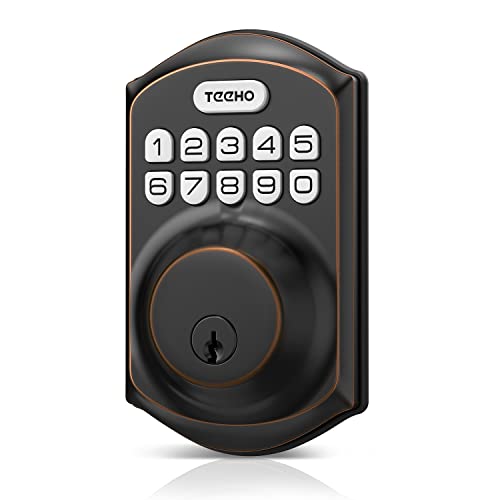
This Oil-Rubbed Bronze variant matches the Satin Nickel model’s functional design with 20 user codes, a temporary single-use code, and auto-lock timing (adjustable 10–99 seconds). It emphasizes consistent performance while offering a finish that complements darker door aesthetics. Installation remains straightforward for standard doors and supports quick access control for households and small offices alike.
Buying Guide: Key Considerations For Push Button Code Door Locks
- Access Methods: Decide between keypad-only, biometrics (fingerprint), or combined options. Keypads are simple for families; biometrics add hands-free access and activity logs but may require maintenance for sensor reliability.
- Auto-Lock And Access Timing: Look for programmable auto-lock intervals (e.g., 10–99 seconds) to balance security with convenience. Consider Passage or Privacy Modes for moving days or hosting.
- Code Management: Check how many user codes are supported and whether one-time or temporary codes are available for guests or deliveries. Some models allow unlimited one-time codes.
- Power And Battery Life: Most electronic locks run on replaceable batteries. Battery life varies—3 years is common—so plan for battery checks and replacements. Some locks offer USB-powered emergency access.
- Installation Compatibility: Ensure the lock matches your door type (wood, metal, thickness) and bore size. Some are more forgiving with left/right-handed doors or require minor adjustments.
- Security Features: Consider tamper alerts, alarm options, and anti-theft design elements. Biometric readers may require an admin fingerprint to enable initial use.
- Backup Access: Keys or cards provide fallback access if the electronic system fails. Choose locks offering multiple backup methods for reliability.
- Smart Features: App control and access logs can improve monitoring. If remote access is important, verify compatibility with your home automation ecosystem.
- Aesthetics And Finishes: Select finishes (satin nickel, oil-rubbed bronze, matte black) that complement exterior and interior hardware while maintaining visibility on entry doors.