For makers, hobbyists, and small businesses, laser engravers and cutters offer precise engraving and clean cuts across wood, acrylic, leather, and more. This guide highlights five top-rated systems that balance power, accuracy, and ease of use. Each option supports creative projects from custom signs to detailed jewelry, with varying working areas and power levels to fit your needs and budget. Read on to compare capabilities and find the right laser solution for your workflow.
| Product | Brand | Max Power (mW/W) | Working Area |
|---|---|---|---|
| ACMER S1 Laser Engraver 2500mW | ACMER | 2500 mW | 130×130 mm |
| ACMER S1 Laser Engraver 3500mW | ACMER | 3500 mW | 130×130 mm |
| Twotrees TTS-55 Pro | Twotrees | 5500 mW | 300×300 mm |
| ORTUR Laser Master 2 S2 LU2-10A | Ortur | 10000 mW | 390×410 mm |
| Creality Laser Engraver (10W) | Creality | 10000 mW | 17″ x 16″ |
Note: Each product section below provides a concise overview, key features, and direct link to its Amazon listing for quick comparison and potential purchase. All figures are as listed by the manufacturers and retailers at the time of writing.
ACMER S1 Laser Engraver 2500mW
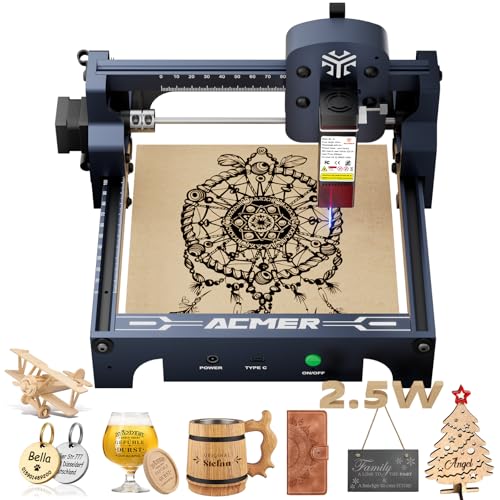
The ACMER S1 2500mW laser engraver offers high-precision engraving and cutting with a compact 130×130 mm working area. It delivers up to 10,000 mm/min engraving speed and 0.01 mm repeatable positioning accuracy. The device operates with a 2 mm focal length and 455±5 nm wavelength, making it suitable for wood, acrylic, and certain metals. It comes with AcmerTool engraving software, and supports other popular workflows for flexible use. The dual-function design enables engraving and cutting on a range of materials, from crafts to small professional projects.
ACMER S1 Laser Engraver 3500mW

This higher-powered variant features a 3500 mW diode laser and 36W machine output with the same 130×130 mm working area. It maintains a 455±5 nm wavelength and 2 mm focal length, enabling ultra-fine engraving precision up to 0.01 mm. It supports a wide material range including wood, bamboo, leather, plastic, PCB, aluminum oxide, and ceramics. The unit ships with free AcmerTool software and works with other common engraving programs for flexible creative workflows.
Twotrees TTS-55 Pro Laser Engraver

The Twotrees TTS-55 Pro delivers 5500 mW of laser power and a substantial 300×300 mm working area, enabling deeper cuts and broader projects. It features a 0.08×0.46 mm fast focus and supports materials like wood, leather, acrylic, paper, and more. The machine includes an air-assisted option for cleaner cuts and deeper penetration, with a modular build designed for easier upgrades and maintenance. It’s well-suited for hobbyists and small businesses pursuing larger-format projects.
ORTUR Laser Master 2 S2 LU2-10A

ORTUR’s Laser Master 2 S2 LU2-10A is a robust, modular laser cutter with a 10W class power and a 390×410 mm engraving area. It features a compact yet industrial-grade all-metal chassis and an easy 10–15 minute assembly. The device supports common software such as LaserGRBL and LightBurn and is compatible with Windows and MacOS. A built-in air-assist interface helps improve cutting visibility and depth, making it a versatile option for both hobby projects and small-scale production.
Creality Laser Engraver 10W

The Creality Laser Engraver offers a powerful 10W output and a large working area, designed to cut and engrave on wood, metal, paper, acrylic, glass, and leather. It features a high-precision 0.06×0.06 mm spot focus for accurate detailing and fast operation, with a repositioning accuracy under 0.007 inches. The unit includes safety enhancements such as an anti-UV filter acrylic cover to reduce exposure. It’s aimed at users needing higher throughput and larger-scale work without compromising detail.
Buying Guide
Key purchase considerations help you pick the right laser engraver or cutter for your needs. Consider the following perspectives:
- Power and cutting capability: Higher wattage enables deeper cuts in thicker materials, but may require better ventilation and safety considerations. Determine the maximum material thickness you plan to cut.
- Working area: Choose a bed size that fits your typical project size. Smaller machines are portable and affordable, while larger beds enable bigger signs and furniture detailing.
- Precision and speed: Look for a fine focal length and repeatable positioning accuracy for consistency across runs. Speed affects throughput for batch work.
- Software compatibility: Verify that the machine ships with reliable engraving software and supports popular tools like LightBurn, LaserGRBL, or proprietary options you already use.
- Materials compatibility: Ensure the device can engrave and cut the materials you need (wood, acrylic, leather, PCB, glass, metal). Some systems perform better on certain substrates.
- Safety and maintenance: Consider protective enclosures, UV filters, and ease of cleaning and upgrading parts. Class ratings and ventilation requirements are important for safe operation.
- Upgrade path and support: Modular or serviceable designs help with future upgrades. Check for firmware updates, spare parts, and responsive customer support.
- Budget and total cost of ownership: Beyond the upfront price, factor in costs for consumables, replacement parts, software licenses, and workshops or training if needed.
| Use Case | Recommended Power Range | Ideal Working Area | Notes |
|---|---|---|---|
| Small crafts and signage | 2–5W | 130×130 mm | Compact, affordable options |
| Medium projects and prototyping | 5–10W | 300×300 mm | Greater versatility |
| Large pieces or production | 10W+ | 390×410 mm or larger | Higher equipment investment |